
CDN parameters & edge rules
ConvexFS supports passing extra query parameters through to Bunny.net’s CDN. These parameters can trigger Edge Rules for on-the-fly transformations like setting custom headers, image optimization, watermarking, and more.
How it works
Section titled “How it works”When you build a download URL with extra parameters using buildDownloadUrl:
- The parameters are JSON-encoded into a single
cdn-paramsquery parameter - When ConvexFS processes the download request, it decodes these parameters and appends them to the CDN URL
- If token authentication is enabled, the parameters are included in the cryptographic signature—users cannot tamper with them
- Bunny.net’s Edge Rules can inspect these parameters and modify the response
The downloadAuth callback also receives these parameters, allowing you to make
authorization decisions based on them.
buildDownloadUrl
Section titled “buildDownloadUrl”The buildDownloadUrl function accepts an optional fifth parameter for extra
CDN parameters:
import { buildDownloadUrl } from "convex-fs";
// Without extra params (existing behavior)const url = buildDownloadUrl(siteUrl, "/fs", file.blobId, file.path);
// With extra paramsconst url = buildDownloadUrl(siteUrl, "/fs", file.blobId, file.path, {  filename: "quarterly-report.pdf",});
downloadAuth callback
Section titled “downloadAuth callback”The downloadAuth callback now receives the extra parameters as a fourth
argument:
registerRoutes(http, components.fs, fs, {  pathPrefix: "/fs",  uploadAuth: async (ctx) => {    /* ... */  },  downloadAuth: async (ctx, blobId, path, extraParams) => {    // extraParams contains any query params passed to the download URL    // (excluding 'path' which is handled separately)
    // Example: only allow certain parameter values    if (extraParams?.quality && extraParams.quality !== "high") {      return false;    }
    return true;  },});
Security
Section titled “Security”When token authentication is enabled (recommended), extra parameters are included in the SHA256 signature that Bunny.net validates. This means:
- Users cannot modify parameter values without invalidating the URL
- Users cannot add new parameters that weren’t in the original signed URL
- Users cannot remove parameters from a signed URL
This is critical for edge rules that control access or transformations—you can trust that the parameters reaching your edge rules are exactly what your application specified.
Example: Custom download filenames
Section titled “Example: Custom download filenames”By default, when users download files from ConvexFS, their browser uses the blob
ID (a UUID) as the filename. This results in downloads like
a1b2c3d4-e5f6-7890-abcd-ef1234567890 instead of quarterly-report.pdf.
You can fix this using a Bunny.net Edge Rule that sets the Content-Disposition
header based on a filename parameter.
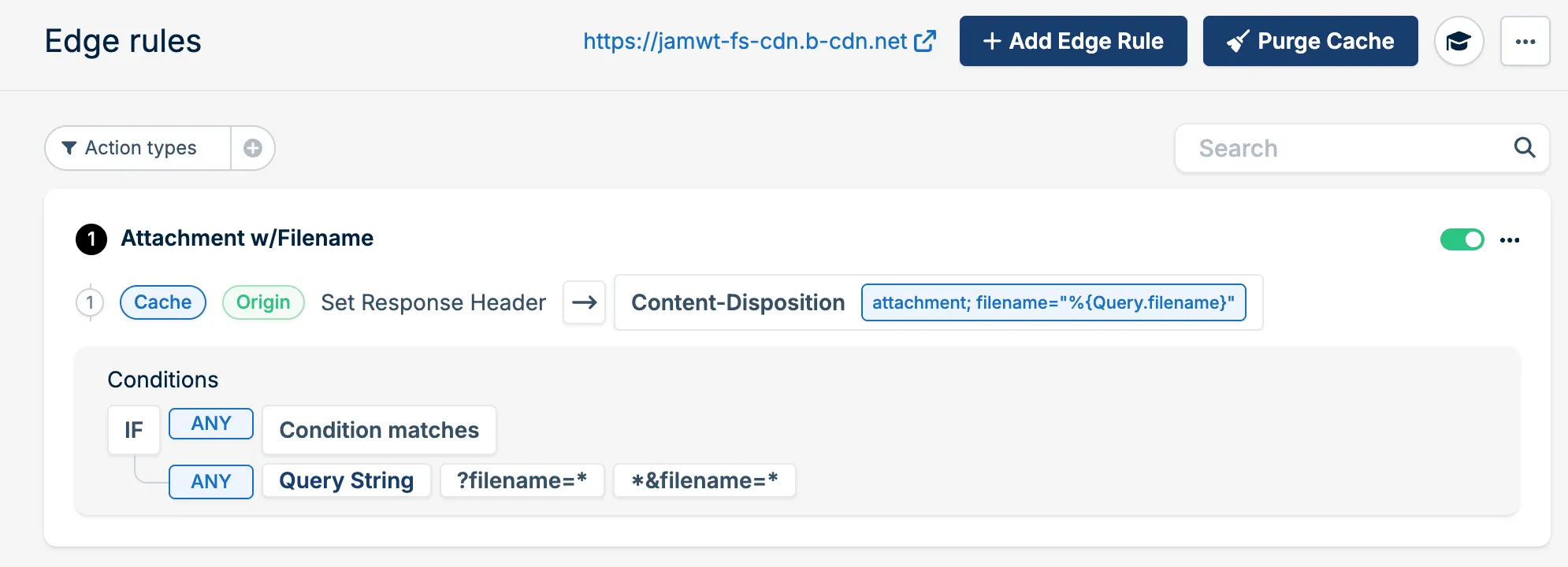
1. Configure the edge rule in Bunny.net
Section titled “1. Configure the edge rule in Bunny.net”In your Bunny.net Pull Zone settings, navigate to Edge Rules and create a new rule:
Action: Set Response Header → Content-Disposition →
attachment; filename="%{Query.filename}"
Condition: If ANY condition matches:
- Query String →
?filename=* - Query String →
*&filename=*
Here’s what the rule should look like:
2. Build download URLs with filename
Section titled “2. Build download URLs with filename”Update your download URL construction to include the original filename:
import { query } from "./_generated/server";import { v } from "convex/values";import { buildDownloadUrl } from "convex-fs";import { fs } from "./fs";
export const getDownloadUrl = query({  args: { path: v.string() },  handler: async (ctx, args) => {    const siteUrl = process.env.CONVEX_SITE_URL!;    const file = await fs.stat(ctx, args.path);    if (!file) {      return null;    }
    // Extract filename from path (e.g., "/documents/report.pdf" -> "report.pdf")    const filename = args.path.split("/").pop() ?? "download";
    return buildDownloadUrl(siteUrl, "/fs", file.blobId, args.path, {      filename,    });  },});
3. Using it in React
Section titled “3. Using it in React”import { useQuery } from "convex/react";import { api } from "../convex/_generated/api";
function DownloadButton({ path }: { path: string }) { const url = useQuery(api.files.getDownloadUrl, { path });
if (!url) return null;
return ( <a href={url} download> Download </a> );}Now when users click the download link, their browser will save the file with its original name instead of the blob UUID.
Other use cases
Section titled “Other use cases”Edge Rules open up many possibilities beyond custom filenames. Here are some ideas to explore:
- Image optimization: Pass
widthandheightparameters for on-the-fly resizing using Bunny Optimizer - Format conversion: Request different image formats (WebP, AVIF) based on browser support
- Watermarking: Add watermarks to images or documents dynamically
- Cache control: Vary caching behavior based on parameters
- Access logging: Include user or session IDs for analytics
See the Bunny.net Edge Rules documentation for the full range of conditions and actions available.